 Pickeroni
From meal plan to shopping list – in one step
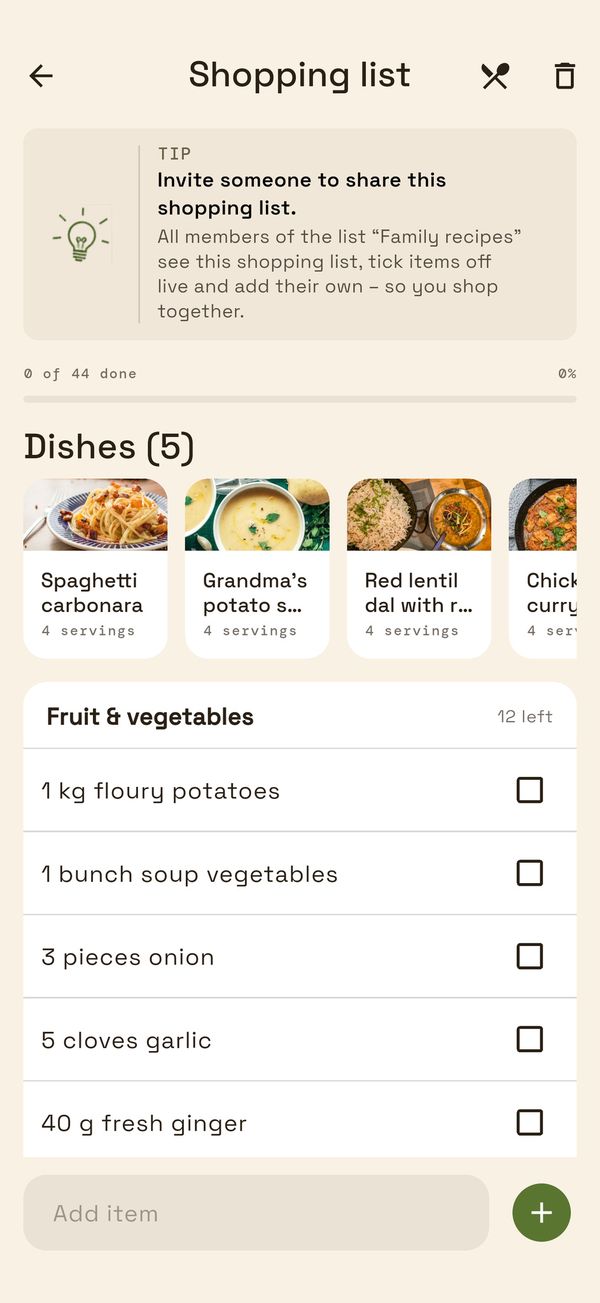
Set the period, pick recipes, and Pickeroni creates the shopping list: quantities scaled to your servings, identical ingredients combined.
How the list comes together
Set the period
Choose this week, next week or a custom period – and whether only you see the plan or all members of a list.
Pick recipes
Search recipes, filter by category and select them, set the number of people per recipe – and your meal plan is done.
Generate the shopping list
The list is created from the plan (or directly from selected recipes). You don't have to type anything.
Shop and tick off
Tick items off – in a shared list everyone sees what's already done. You add your own items with the unlock.
What the meal plan can do
- Choose the period: this week, next week or custom.
- Set the number of people per recipe; a favourite dish can also be planned several times.
- Tick off what's been cooked: recipes are listed under “Still to cook” or “Cooked”.
- Personal or assigned to a list – then all members see it.
- Name, period, recipes and servings can be changed later; what's already been cooked stays ticked off.
What exactly happens
- Quantities are scaled to the chosen servings.
- The same ingredient with the same unit is added up (e.g. onions from three recipes).
- Ingredients with different units remain separate items – there's no conversion between units.
- Ingredients without a quantity aren't combined.
- Quantities are rounded to kitchen-friendly values.
- The list is sorted by supermarket aisle: fruit and vegetables first, frozen food last.
What the meal plan isn't
Pickeroni isn't a calendar with fixed days: a meal plan is a period with selected recipes and servings, not “Monday is pasta day”. The shared shopping list updates while it's open; there's no notification about changes. For free you can create 5 meal plans in total; a one-time purchase of €4.99 lifts the limits* – no subscription.
Questions about meal plans and shopping lists
Can I put my own things like toilet paper on the list?
Yes, with the unlock: your own items are part of the one-time purchase. Ingredients from recipes always go on the list for free.
Does everyone see what's already been bought?
Yes, if the shopping list belongs to a shared list: when someone ticks an item off, everyone who has the shopping list open sees it – without reloading.
Does Pickeroni convert units, such as grams into tablespoons?
No. Identical ingredients with the same unit are added up, different units remain separate items.
Not sure yet what should go on the plan? Let the group vote.